

Four easiest ways to use AI in sales
Thanks to artificial intelligence, many sales areas can be made more efficient, and large organisations already have extensive processes and comprehensive strategies for AI. However, the use of AI itself still seems to be quite new, especially for many more experienced salespeople, or at least it can feel very alien.
That's why I decided to compile a list of the four easiest ways to use AI in sales, in order from easiest to hardest, none of which require expensive licenses or advanced degrees in computer science.
- AI to support sales in prospecting and lead generation
- Artificial intelligence to support sales in preparing for meetings
- Artificial intelligence to support sales in creating conversation summaries
- Artificial intelligence to support sales analytics
Why is AI so important for sales?
AI has been making its way into business for several years now, and sales is one of the activities where it has helped enormously. AI in sales is no longer just an optional extra that tech-savvy guys can use to make their jobs easier - it's a must-have to stay competitive.. Without competitiveness, there is no competitive advantage, and customers will quickly flee to greener pastures.
AI has the potential to make sales work so much more efficiently that players who do not use AI will soon be out of the competition altogether. Even with very limited AI skills, an inexperienced salesperson will be able to raise his or her level so much that no amount of years of experience will necessarily be enough to make up for it.
That's why AI needs to become a buddy for your own sales work and artificial intelligence must no longer be the hated new vimpain that all the youth are glorifying.
AI to support sales in prospecting and lead generation
A good salesperson will make sure that they always have enough people to contact - leads, prospects or whatever you want to call them. AI is the perfect sparring partner for this. For example, if your target group is a chemical company that exchanges at least €50 million a year, you can even find a toll-free Copilot quite good options (see picture below).
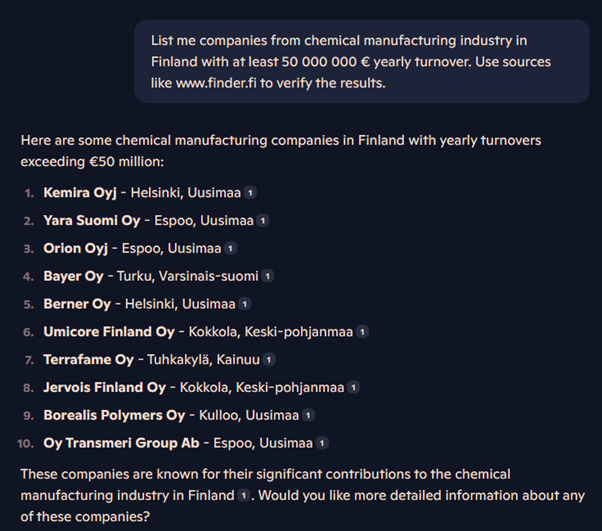
Of course, paid tools can go much further and even find direct decision-maker data. However, you can get started without having to pay a separate fee.
Artificial intelligence to support sales in preparing for meetings
When things get busy, it often happens that you go to meet a new customer with incomplete information. In the worst case, the meeting will then wonder what this guy was again and what he might be interested in. Alternatively, you go well prepared after hours of browsing through company pages, annual reports and industry megatrends.
Much of this work can now be corrected by artificial intelligence. Free of charge ChatGPT For example, with 4o mini you can create a short brief of this type from More Than Training Company (see image below).
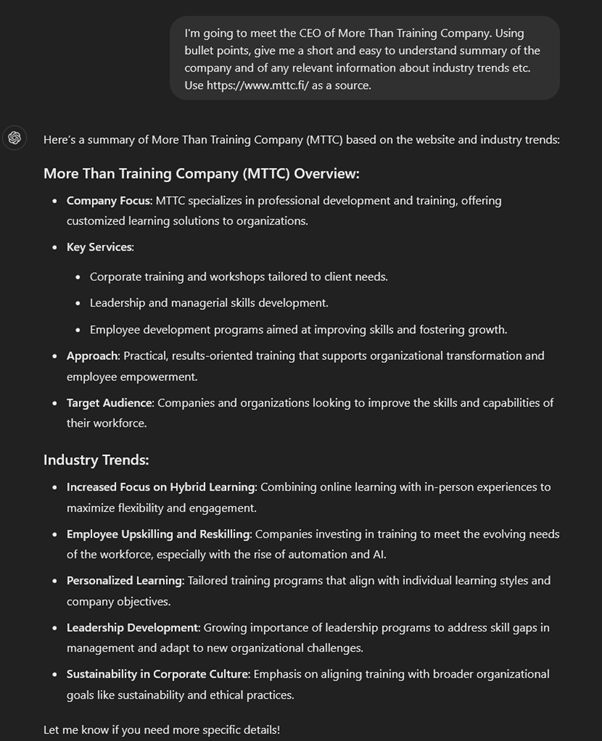
The paid version provides access to more up-to-date information and allows you to create company and activity-specific AI tools to streamline and refine your process. However, these preparation materials should themselves be further refined and supplemented with information where appropriate, to ensure that they can be used to their full advantage in the customer encounter itself.
Artificial intelligence to support sales in creating conversation summaries
I tend to take notes on each client encounter, so that the next time I meet the person I remember our previous conversations as well as possible. And of course, many organisations also require these notes to be recorded in the CRM anyway, so at least some sort of note has to be made anyway.
Often, however, these notes are a bit confusing, as the topic may change during the discussion and the theme of the discussion may change. And heaven help us if this information has to be interpreted by someone else who was not at the meeting - it won't make any difference.
In this case, the notes, at least in that form, will no longer really refresh the memory when the next encounter takes place, but may be confusing, or at least take an insane amount of time to decipher. However, AI has become quite good at supporting in such situations.
In practice, the discussions are summarised as follows:
Step 1: Transfer your notes to electronic format
The notes need to be in a format that the AI can understand, so that they can be summarised. So if your notes are already in Word, for example, there is no need for this step.
Step 2: Anonymise the text
By default, many AI solutions also share the data you enter with other users. Because of this remove any reference to a company, person or other identifiable element from the raw text of the memo., so that discussions held in confidence do not fall into the wrong hands.
This is unlikely to be necessary when using business-specific AI tools. However, please check with your organisation's AI manager before you act!
Step 3: Make your text available to AI
Enter the anonymised text as a file or text to the AI and ask for a summary of the text. A good prompt or request to the AI could be, for example, ”Condense the text below into a note in CRM” or ”Condense the attached text into a note in CRM”.
Step 4: Check the AI's summary
In general, AI can make good summaries, but sometimes it tends to draw conclusions that are too straightforward. That's why the summary still needs to be checked to make sure that no false assumptions or other ”hallucinations” have been made.”.
At this stage, also include any identifying information for internal use if you removed it earlier when anonymising the text.
Step 5: Export the data
With the memo finally in order after review and completion, it's time to transfer the data to the recovery in the right place. The most typical storage locations are the CRM system or other place where you have agreed to share this type of information.
The list is long, but in reality it takes a few practice sessions, a few minutes at most. No special paid tool is needed, e.g. a free of charge ChatGPT is able to summarise practically as well as the debit side.
However, if your company had small investment funds available for technology development, for example. Copilot with a paid company-specific version it is possible to skip most of these steps during remote meetings, as it creates notes directly from Team discussions.
Artificial intelligence to support sales analytics
After using AI for a while, you as a salesperson will probably notice that data on these encounters and opportunities has started to accumulate quite a bit. There are memos, chalk lists, preparation materials, you name it. Now is the perfect time to put this data to use.
A word of warning: this is the only one of the habits that may require a little more work in the midst of the everyday hustle and bustle. So it's worth setting aside a little time for your first experiment, so that you don't get caught up in the rush and lose enthusiasm.
Step 1: Think about the question you want answered
It all starts with a question. For example, have you considered what kind of customers are really buying from you? And why some customers have chosen another partner? Or do you dread the thought that you've inadvertently passed up a potential prospect?
So choose the question for which getting the most objective answer is likely to improve the effectiveness of your work. For example, let's use the question of buying customers as an example.
Step 2: Collect the data you need
It's time to open a CRM or some other tool where you keep track of all those customers you think are buying. So take all the information you need, say in Excel or Word, about the companies that have bought from you or, more broadly, from you in, say, the last two years.
This information can usually be extracted in bulk from modern CRM systems. If necessary, you can also enter the data manually or ask the system administrator to create a list of these companies - especially if there is a lot of data and you cannot get it out of the system yourself.
Step 3: Ask AI for help
Now is the time to open the AI tool and ask for help. The one used in the example In the paid version of ChatGPT you can attach the list you've collected as a file directly to the AI for interpretation, whereas with the free version you'll probably have to phrase the question slightly differently and list the businesses underneath separately manually.
Please note that if you do not have a customised environment created for your company, the data should be anonymised, if necessary, before being passed on to AI. However, if it's just a list of companies, there shouldn't be any problems.
Below is an example, using a fictitious list of six companies as an illustration. Each of the companies employs at least 100 people and its main activity according to the TOL2008 classification is software design and manufacturing.
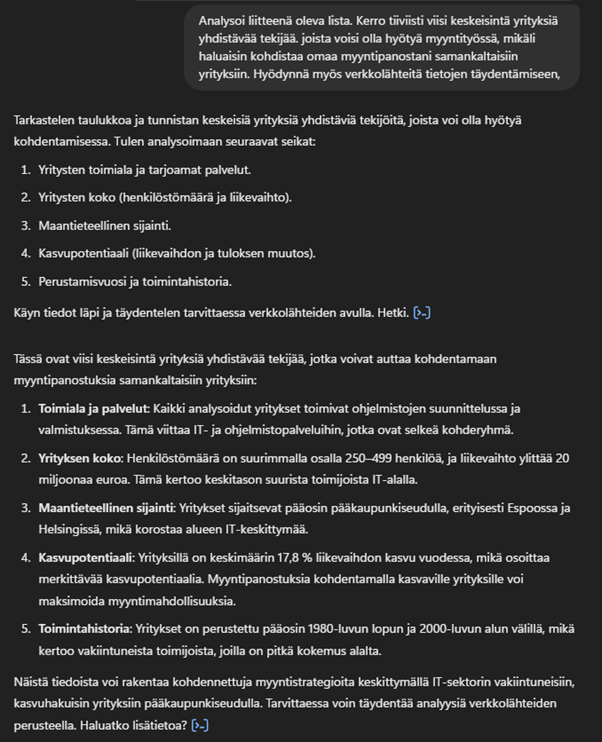
In this example, we could therefore say that if we want more similar customers, we should focus our sales efforts:
- Medium to large companies.
- IT and software services.
- To companies that are growing fast.
- Companies located in the capital region.
In reality, there is likely to be more variation in the results, as it is not just a sample list full of inherently similar companies.
Closing words
These four tools are all ways that, with very little effort, anyone from AI innovators to AI virtuosos can make their own sales work faster and easier without investing heavily in systems. And most importantly - by using these tools, you as a salesperson will have more time for the most important task of all - meeting the customer as a human being and thereby an excellent customer experience to create. So AI in sales is here to stay and it's up to you to decide whether you want to be left behind or whether it's your future best friend.
Have fun experimenting and learning with AI!
PS: Leader! Would you like to talk more about the theme and think about what it all means in your company or for your team? Send a message or book an appointment, let's sit down in Teams - I promise to give you each at least one concrete idea of how AI could support your work in sales!